|
|
|
 |
DVD Ripper for Mac is an all-in-one Mac DVD ripper software program. It is an excellent tool for Mac users to rip DVD to various video formats (including MP4, AVI, M4V, MOV, 3GP, MPG, FLV) and audio formats (MP3, M4A, AAC, WAV, OGG, APE, etc.) for playback on iPod touch, iPod classic, iPod nano, iPhone, Apple TV, PSP, PS3, Youtube (web), Creative Zen, iRiver PMP, Archos, all kinds of video cell phones and digital video and audio players. It is everything you need to put your DVD movies on your mobile devices.
Put your DVD movies on almost any mobile devices with this professional Mac DVD Ripping software! |
|
|
|
|
 |
|
|
 |
| |
Key Functions of DVD Ripper for Mac |
|
•Rip DVD to video formats including MP4, AVI, M4V, MOV, 3GP, MPG, FLV and audio formats including MP3, M4A, AAC, WAV, OGG, APE, etc.
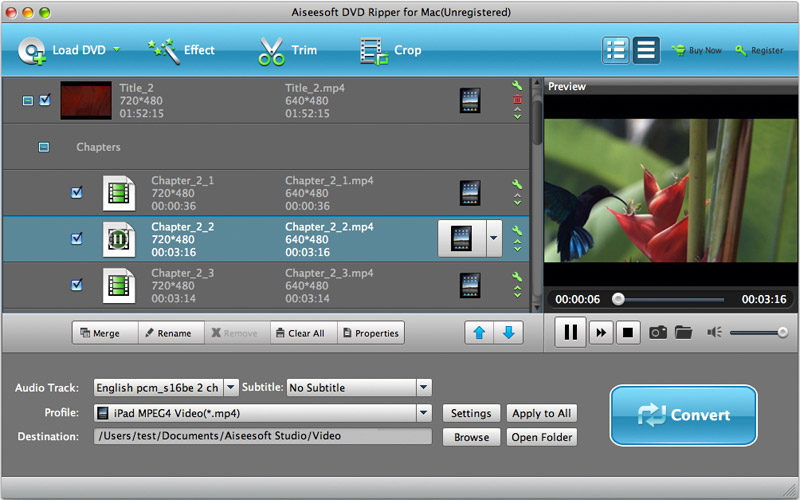
•Support video trimming, video cropping, video effect adjustment and video file merging.
•Rip DVD to various video formats with customized file size and output quality. . |
|
Key Features of DVD Ripper for Mac |
|
•Support Mac OS
A powerful DVD Ripper for Mac OS users.
•Support Power PC and Intel Processors
A professional Mac DVD Ripper application that can be run on computers with either Power PC or Intel processors.
•Convert DVD to popular video and audio formats
Rip DVD to video formats including MP4, AVI, M4V, MOV, 3GP, MPG, FLV and audio formats including MP3, M4A, AAC, WAV, OGG, APE, etc.
•Support all sorts of mobile video and audio players
Rip DVD to various video and audio formats that can be played on iPod touch, iPod classic, iPod nano, iPhone, Apple TV, PSP, PS3, Youtube (web), Creative Zen, iRiver PMP, Archos, all kinds of video cell phones and digital video and audio players.
•Select DVD subtitle and audio track
Allow you to select any subtitle and audio track to convert your DVD in any language available on your DVD.
• Rip and trim DVD chapters / titles
Let you trim any DVD titles or chapters to capture clips from your DVD movie.
• Crop Video
Crop your DVD video to remove the black video sides.
•Powerful video and audio settings
Provide you with various video and audio settings including video resolution, video frame rate, video bit rate, audio bit rate, audio sample rate and so on.
•Merge DVD chapter/title
Let you convert the selected chapters or titles into one file.
• Preview movie
Let you preview your movie before and during the conversion.
• Various video effects
Allow you to adjust video brightness, contrast and saturation, and let you choose to apply a special video effect to your movie video
• Conversion progress bar
A progress bar to show you the elapsed time and remaining time of the conversion progress.
|
|
Why Choose DVD Ripper for Mac? |
|
• DVD Ripper for Mac is the best DVD Ripper software for Mac OS users to convert DVD for almost all popular mobile devices.
• DVD Ripper for Mac provides you with powerful functions to edit your DVD movie including video crop, movie trimming, different video effect settings, subtitle and audio track selection and so on.
• DVD Ripper for Mac has a very professional and user-friendly interface that can guide you to convert your DVD with just a few clicks. |
System Requirements of DVD Ripper for Mac |
|
• MAC OS X (include Mac OS X 10.5 Leopard) or above operating system.
• At least 512M physical RAM.
• At least one DVD-ROM.
• Intel® processor
• 1024*768 resolution display or higher.
|
|
 |
 |
 |
 |
 |
|
|